
Building AI applications requires more than understanding algorithms. You need the right software for AI to connect models, manage data, handle inference, and deploy features users can access. The shift toward intent-first development means developers must understand how different tools fit together in real workflows. This article breaks down the software categories, tools, and integration patterns you need to build production-ready AI applications in 2026.
API Platforms and Model Providers
The foundation of most AI applications starts with accessing models through APIs. Rather than training from scratch, developers integrate pre-trained models through provider endpoints.
OpenAI and Anthropic APIs
OpenAI's GPT-4 and o1 models provide text generation, reasoning, and function calling. The API accepts system prompts, user messages, and structured outputs through JSON mode. Anthropic's Claude API offers similar capabilities with extended context windows and constitutional AI features.
Key integration points:
- Authentication using API keys in headers
- Managing conversation state across requests
- Handling streaming responses for real-time output
- Cost optimization through caching and prompt engineering
Both platforms offer SDKs for Python, Node.js, and other languages. The actual implementation involves sending POST requests to endpoints with properly formatted message arrays.

Google Vertex AI and Azure OpenAI
Enterprise deployments often require additional compliance and data residency controls. Google Vertex AI provides access to Gemini models within Google Cloud infrastructure. Azure OpenAI Service offers OpenAI models through Microsoft's cloud with enterprise SLAs.
These platforms add deployment complexity but provide better integration with existing cloud workflows, VPCs, and security controls. The software for AI selection depends on your infrastructure constraints and compliance requirements.
Frameworks and Development Libraries
Raw API calls work for simple use cases, but production applications need structured frameworks to handle prompt management, context handling, and multi-step workflows.
| Framework | Primary Use Case | Key Feature | Language |
|---|---|---|---|
| LangChain | Multi-step chains | Agent orchestration | Python, JS |
| LlamaIndex | Data retrieval | Document indexing | Python |
| Semantic Kernel | Enterprise integration | Plugin system | C#, Python |
| Haystack | Search pipelines | RAG workflows | Python |
LangChain for Orchestration
LangChain provides abstractions for chains, agents, and retrievers. A chain connects multiple steps like retrieval, processing, and generation. Agents use models to decide which tools to call based on user input.
from langchain.chains import RetrievalQA
from langchain.vectorstores import Pinecone
from langchain.embeddings import OpenAIEmbeddings

vectorstore = Pinecone.from_existing_index(
    index_name="docs",
    embedding=OpenAIEmbeddings()
)

qa_chain = RetrievalQA.from_chain_type(
    llm=ChatOpenAI(model="gpt-4"),
    retriever=vectorstore.as_retriever()
)
This code creates a retrieval-augmented generation (RAG) pipeline. The vectorstore retrieves relevant documents, and the LLM generates answers based on that context.
LlamaIndex for Data Integration
LlamaIndex specializes in connecting unstructured data sources to language models. It handles document loading, chunking, embedding, and retrieval in a unified interface.
The software handles parsing PDFs, websites, databases, and APIs into a searchable index. Query engines then retrieve relevant chunks and synthesize responses using connected LLMs.
Vector Databases and Storage
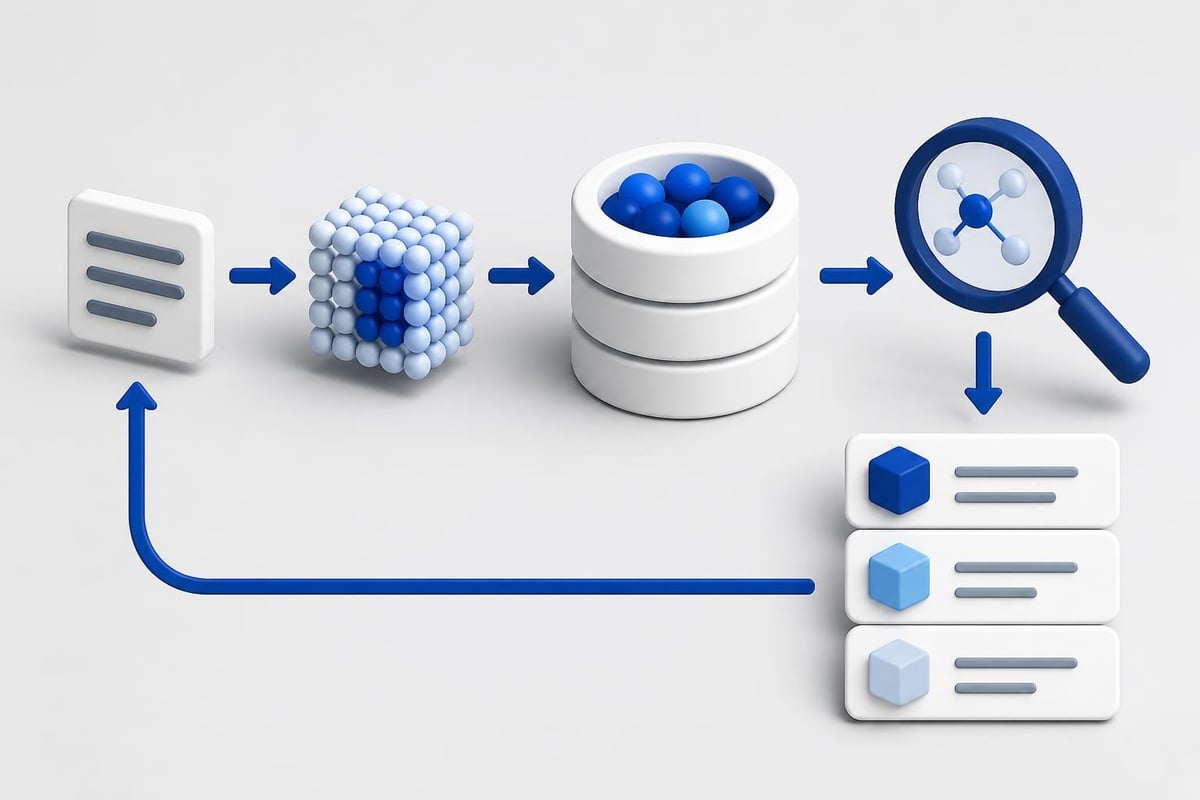
Effective AI software development requires storing embeddings for semantic search and retrieval. Vector databases optimize for similarity search rather than exact matches.
Popular vector database options:
- Pinecone (managed, serverless)
- Weaviate (open-source, schema-based)
- Qdrant (Rust-based, fast filtering)
- Milvus (distributed, scalable)
- Chroma (embedded, local-first)
Each database handles embedding storage differently. Pinecone offers fully managed infrastructure with automatic scaling. Weaviate provides schema definitions for structured metadata filtering alongside vector search.
Implementing Vector Search
A typical vector search workflow involves three steps:
- Generate embeddings using models like OpenAI's text-embedding-3-small or open-source alternatives
- Store vectors with metadata in the database
- Query by converting user input to an embedding and finding nearest neighbors
import pinecone
from openai import OpenAI

client = OpenAI()
pinecone.init(api_key="your-key")
index = pinecone.Index("knowledge-base")

# Store document
embedding = client.embeddings.create(
    input="Your document text",
    model="text-embedding-3-small"
).data[0].embedding

index.upsert([("doc-1", embedding, {"source": "manual"})])

# Search
query_embedding = client.embeddings.create(
    input="User question",
    model="text-embedding-3-small"
).data[0].embedding

results = index.query(query_embedding, top_k=5, include_metadata=True)
The metadata filtering capabilities let you scope searches to specific document types, dates, or user permissions.
Deployment and Inference Infrastructure
Moving from development to production requires infrastructure that handles scaling, monitoring, and cost management. While AI has impacted coding speed, deployment stability requires careful platform selection.
Hosting Options
| Platform | Model Support | Pricing Model | Best For |
|---|---|---|---|
| Replicate | Open-source models | Per-second compute | Testing various models |
| Modal | Custom containers | Reserved capacity | Batch processing |
| HuggingFace Inference | HF models | Free tier + pro | Prototyping |
| AWS SageMaker | Any framework | Instance hours | Enterprise ML |
| RunPod | GPU rentals | Hourly GPU | Cost-sensitive workloads |
Replicate makes it simple to run models like Stable Diffusion, Llama, or Whisper without managing infrastructure. You call their API and pay for actual inference time.
Modal provides a Python-first deployment platform where you define functions that run on remote GPUs. It handles containerization, scaling, and cold start optimization automatically.
Serverless vs. Dedicated Compute
Serverless endpoints scale to zero when unused but have cold start latency. Dedicated instances provide consistent performance but cost more during low traffic.
The software for AI deployment should match your traffic patterns. High-volume, predictable workloads benefit from reserved capacity. Sporadic usage works better with serverless scaling.
Development Tools and IDEs
Modern AI development happens in specialized environments that understand model context, API calls, and debugging patterns. Tools like GitHub Copilot and Cursor provide AI-assisted coding, but dedicated AI development platforms offer more specialized features. Understanding how to leverage AI in coding workflows improves productivity when building these applications.
Jupyter and Notebooks
Jupyter notebooks remain standard for experimentation. They allow iterative development where you test API calls, visualize outputs, and adjust prompts without full application restarts.
Extensions like Jupyter AI add chatbot interfaces directly in notebooks. You can ask questions about code, generate cells, or explain errors without leaving your development environment.
Prompt Engineering Platforms
Dedicated prompt development tools help teams version, test, and deploy prompts separately from application code:
- PromptLayer tracks prompt versions with analytics
- LangSmith provides debugging for LangChain applications
- Weights & Biases Prompts manages prompt experiments with A/B testing
These platforms separate prompt logic from code, making it easier for non-engineers to improve model behavior without deploying new application versions.
Monitoring and Observability
Production AI applications require specialized monitoring beyond standard APM tools. You need to track model performance, token usage, latency, and output quality.
Essential metrics to monitor:
- Token consumption per request
- Response latency (p50, p95, p99)
- Error rates by model and endpoint
- User feedback and ratings
- Cost per user/session

Observability Platforms
LangSmith provides end-to-end tracing for LangChain applications. Each chain execution shows timing for retrieval, LLM calls, and tool usage. You can replay sessions, test variations, and identify bottlenecks.
Helicone wraps OpenAI and Anthropic API calls to collect metrics without code changes. It tracks costs, caches responses, and provides usage analytics across your team.
Weights & Biases integrates with training workflows and prompt experiments. It versions datasets, models, and prompts while tracking performance metrics over time.
Fine-Tuning and Model Customization
While APIs provide access to general models, custom behavior often requires fine-tuning on domain-specific data. The software for AI fine-tuning has become more accessible in 2026.
Platform Options
OpenAI's fine-tuning API lets you train custom GPT-3.5 and GPT-4 variants on your data. You upload training examples in JSONL format, configure hyperparameters, and deploy the resulting model to a dedicated endpoint.
Hugging Face AutoTrain simplifies fine-tuning open-source models. You provide a dataset, select a base model, and the platform handles training on cloud GPUs. The resulting model deploys to Hugging Face Inference or exports for self-hosting.
For developers building artificial intelligence based projects, understanding when to fine-tune versus using few-shot prompting affects both cost and performance.
When to Fine-Tune
Fine-tuning makes sense when:
- You have 500+ high-quality training examples
- The task requires consistent formatting or style
- Prompt engineering hits context length limits
- You need lower latency from smaller models
Few-shot prompting works better for:
- Rapid iteration on behavior
- Tasks with fewer than 100 examples
- Situations requiring frequent changes
- Budget constraints around training costs
Data Annotation and Labeling
Quality training data requires human-in-the-loop annotation. Software for AI annotation has evolved from basic labeling tools to platforms that integrate with model training pipelines.
| Platform | Use Case | Features | Integration |
|---|---|---|---|
| Label Studio | Multi-modal annotation | Custom interfaces | ML backends |
| Prodigy | Active learning loops | NLP-focused | spaCy integration |
| Scale AI | Managed annotation | Expert labelers | API-based |
| Snorkel | Programmatic labeling | Weak supervision | Python library |
Label Studio provides open-source annotation with support for text, images, audio, and video. You define labeling templates in XML and export to formats compatible with popular frameworks.
Prodigy focuses on reducing annotation time through active learning. The model suggests labels, annotators approve or correct them, and the model improves in real time.
Building Production Workflows
Connecting these tools into cohesive applications requires understanding data flow, error handling, and user experience patterns. Most production AI features follow similar architectural patterns.
RAG Application Architecture
A typical retrieval-augmented generation application includes:
- Document ingestion – Parse, chunk, and embed source material
- Vector storage – Index embeddings with metadata
- Query processing – Convert user input to search queries
- Retrieval – Fetch relevant context from vector store
- Generation – Send context + query to LLM
- Response formatting – Structure output for UI
Each step requires specific software. Python handles ingestion with libraries like LangChain or LlamaIndex. Pinecone or Weaviate manages vector storage. OpenAI or Anthropic generates responses.
The actual implementation involves error handling at each stage, retry logic for API failures, and caching to reduce costs.
Agent-Based Systems
Agents use models to decide which tools to call based on user intent. An agent might have access to:
- Web search API
- SQL database query tool
- Calculator function
- Email sending capability
The agent receives a user request, determines which tools to use, executes them in sequence, and synthesizes results. This requires orchestration software that manages tool calling, validates outputs, and prevents infinite loops.
For developers focused on practical AI applications, building reliable agents means implementing guardrails, timeouts, and fallback behaviors.
Building real applications requires understanding not just individual tools but how they connect in production environments. Whether you're implementing RAG pipelines, fine-tuning models, or deploying agents, the AI Developer Certification (Mammoth Club) provides hands-on projects that teach you to integrate these tools into applications that actually ship.

Testing and Quality Assurance
AI applications introduce non-deterministic behavior that breaks traditional testing approaches. You can't write exact assertions for generated text. Instead, testing software for AI focuses on validation patterns, regression detection, and quality metrics.
Unit Testing AI Components
Test individual components with mocked API responses. Verify your prompt construction, token counting, and error handling work correctly before hitting real models.
import pytest
from unittest.mock import Mock

def test_prompt_construction():
    builder = PromptBuilder()
    messages = builder.create_messages(
        system="You are helpful",
        user="Test question",
        context=["Doc 1", "Doc 2"]
    )

    assert len(messages) == 2
    assert messages[0]["role"] == "system"
    assert "Doc 1" in messages[1]["content"]
Integration tests validate actual API responses meet quality standards. Run a test suite against real endpoints with known inputs and evaluate outputs using LLM-as-judge patterns.
Evaluation Frameworks
Platforms like Braintrust and Promptfoo automate evaluation across prompt versions. You define test cases with expected behaviors, run variations, and compare results using scoring functions.
These tools help catch regressions when updating prompts or switching models. They track performance over time and highlight which changes improve or degrade output quality.
Cost Management and Optimization
Running AI features at scale requires careful cost management. Token-based pricing means every API call has variable costs based on input and output length. Software for AI cost optimization includes caching, prompt compression, and model selection strategies.
Cost reduction techniques:
- Semantic caching to avoid repeat API calls
- Streaming responses to show progress faster
- Using smaller models for simple tasks
- Implementing prompt compression to reduce tokens
- Batching requests when real-time isn't required
Helicone and LangSmith provide cost tracking per user, feature, or endpoint. You can set budgets, receive alerts, and identify expensive queries that need optimization.
For applications with variable traffic, serverless deployment platforms charge only for compute used. But high-volume applications benefit from negotiated rates or reserved capacity with model providers.
Security and Data Privacy
AI applications handle sensitive data in prompts and responses. Security software for AI addresses prompt injection, data leakage, and model access control.
Input Validation
Prompt injection attacks manipulate model behavior through crafted inputs. Validation layers detect suspicious patterns, reject malformed requests, and sanitize user input before sending to models.
LLM firewalls from providers like Lakera and Arthur analyze prompts for injection attempts, PII leakage, and policy violations. They sit between your application and model endpoints.
Access Control
Production deployments require:
- API key rotation and secrets management
- User authentication and authorization
- Audit logging of all model interactions
- Data retention policies for conversations
Cloud platforms provide IAM roles and policies for model access. Self-hosted solutions need custom authentication middleware that integrates with your existing user management.
Understanding software engineering practices for AI systems helps developers build secure, maintainable applications that handle sensitive data appropriately.
Open-Source vs. Proprietary Tools
The software for AI ecosystem includes both proprietary platforms and open-source alternatives. Each approach has tradeoffs around cost, control, and feature availability.
Open-source advantages:
- No API costs for inference
- Full control over deployment
- Model customization without restrictions
- Data privacy through local processing
Proprietary platform benefits:
- Higher quality outputs from latest models
- No infrastructure management
- Built-in safety and moderation
- Regular capability improvements
Many production applications combine both. Use proprietary APIs for complex reasoning and open-source models for classification, extraction, or other focused tasks where smaller models perform well.
Tools like Ollama let developers run open models locally during development, then deploy to cloud infrastructure for production. This hybrid approach balances development speed with deployment flexibility.
Integration Patterns for Existing Applications
Adding AI features to existing software requires integration patterns that don't disrupt current functionality. Whether you're building AI for programming tools or user-facing features, these patterns apply across use cases.
API Gateway Pattern
Route AI requests through a dedicated gateway that handles authentication, rate limiting, and model selection. Your existing application makes standard HTTP requests without understanding model-specific details.
The gateway translates requests to appropriate model formats, manages retries, and normalizes responses. This decouples AI logic from business logic.
Event-Driven Processing
For non-real-time features, publish events to a queue when AI processing is needed. Worker processes consume events, call models, and write results to your database.
This pattern works well for document analysis, content moderation, or batch summarization where immediate responses aren't required.
Streaming Responses
Users expect real-time feedback for generative features. Streaming sends partial responses as tokens generate, providing perceived performance improvements even when total latency remains constant.
Implementing streaming requires:
- Server-sent events or WebSocket connections
- Client-side code to append tokens incrementally
- Error handling for interrupted streams
- Fallback to batch processing when streaming fails
Software for AI connects models, data, and deployment infrastructure into applications users can access. The right combination of APIs, frameworks, databases, and monitoring tools depends on your specific requirements around latency, cost, and scale. Modern AI development means understanding how these pieces fit together and when to use each tool in your stack. AI Code Central helps developers master these integrations through practical tutorials, real-world projects, and step-by-step guides that go beyond theory to build production-ready AI features.