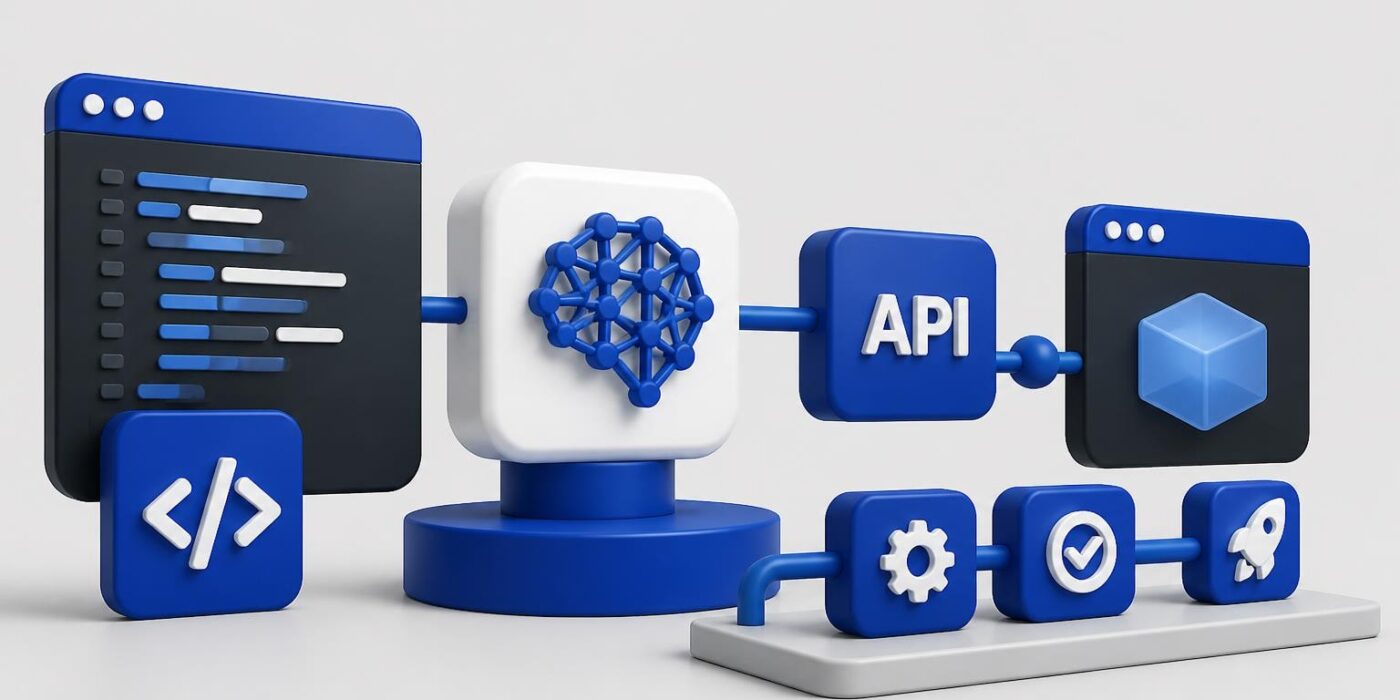
AI software development has moved from experimental novelty to production necessity. Developers today need to build applications that use language models, vector databases, and intelligent automation without sacrificing reliability or control. This shift requires understanding both traditional software engineering principles and AI-specific workflows like prompt design, token management, and handling non-deterministic outputs. Modern ai software development combines API integration, testing strategies, and deployment practices into a cohesive workflow that ships real features.
Understanding the AI Development Stack
Traditional software development follows predictable patterns. You write code, test inputs and outputs, and deploy deterministic systems. AI software development adds layers of complexity that require different thinking.
Core components of an AI development stack:
- Language model APIs (OpenAI, Anthropic, Google)
- Vector databases for semantic search and RAG
- Orchestration frameworks (LangChain, LlamaIndex)
- Monitoring and observability tools
- Prompt management systems
- Fine-tuning infrastructure when needed
The infrastructure layer matters more than many developers expect. You need to handle rate limits, retry logic, token counting, and cost tracking. Build these utilities early because you'll use them constantly.

Choosing Your Development Approach
You have three main paths for building AI features:
| Approach | Best For | Trade-offs |
|---|---|---|
| Direct API calls | Simple features, full control | More boilerplate, manual error handling |
| Orchestration frameworks | Complex workflows, RAG systems | Added dependencies, learning curve |
| Managed platforms | Rapid prototyping, non-technical teams | Less flexibility, vendor lock-in |
Start with direct API calls for your first project. Understanding raw requests and responses builds intuition that frameworks abstract away. Once you're handling multi-step workflows or complex data pipelines, orchestration tools become valuable.
Building Production-Ready AI Features
Shipping ai software development projects means treating AI components like any other external dependency. Wrap API calls in services, implement circuit breakers, and cache aggressively where outputs are stable.
Here's a basic structure for an AI service in Python:
import openai
import time
from functools import lru_cache

class AIService:
    def __init__(self, api_key, max_retries=3):
        self.client = openai.OpenAI(api_key=api_key)
        self.max_retries = max_retries

    def generate_completion(self, prompt, model="gpt-4", temperature=0.7):
        for attempt in range(self.max_retries):
            try:
                response = self.client.chat.completions.create(
                    model=model,
                    messages=[{"role": "user", "content": prompt}],
                    temperature=temperature
                )
                return response.choices[0].message.content
            except openai.RateLimitError:
                if attempt < self.max_retries - 1:
                    time.sleep(2 ** attempt)
                else:
                    raise
            except openai.APIError as e:
                raise Exception(f"API error: {str(e)}")

    @lru_cache(maxsize=128)
    def cached_completion(self, prompt, model="gpt-4"):
        return self.generate_completion(prompt, model, temperature=0)
This pattern handles retries, separates cached from non-cached calls, and encapsulates API logic. Production code needs additional error types, logging, and monitoring hooks.
Implementing Effective Prompt Engineering
Prompt engineering drives ai software development quality more than model selection in most cases. A well-designed prompt with GPT-3.5 often outperforms a poorly designed prompt with GPT-4.
Key prompt design principles:
- Be specific about format, length, and style
- Provide examples (few-shot learning)
- Use system messages to set behavior
- Break complex tasks into steps
- Include constraints and validation rules
Test prompts systematically. Create a test suite with expected inputs and outputs, then version your prompts alongside your code. When outputs degrade, you'll know whether to adjust the prompt or investigate API changes.
The AI development best practices guide emphasizes the importance of understanding AI-generated code rather than blindly accepting suggestions, a principle that extends to all AI outputs in production systems.
Integrating Vector Databases and RAG
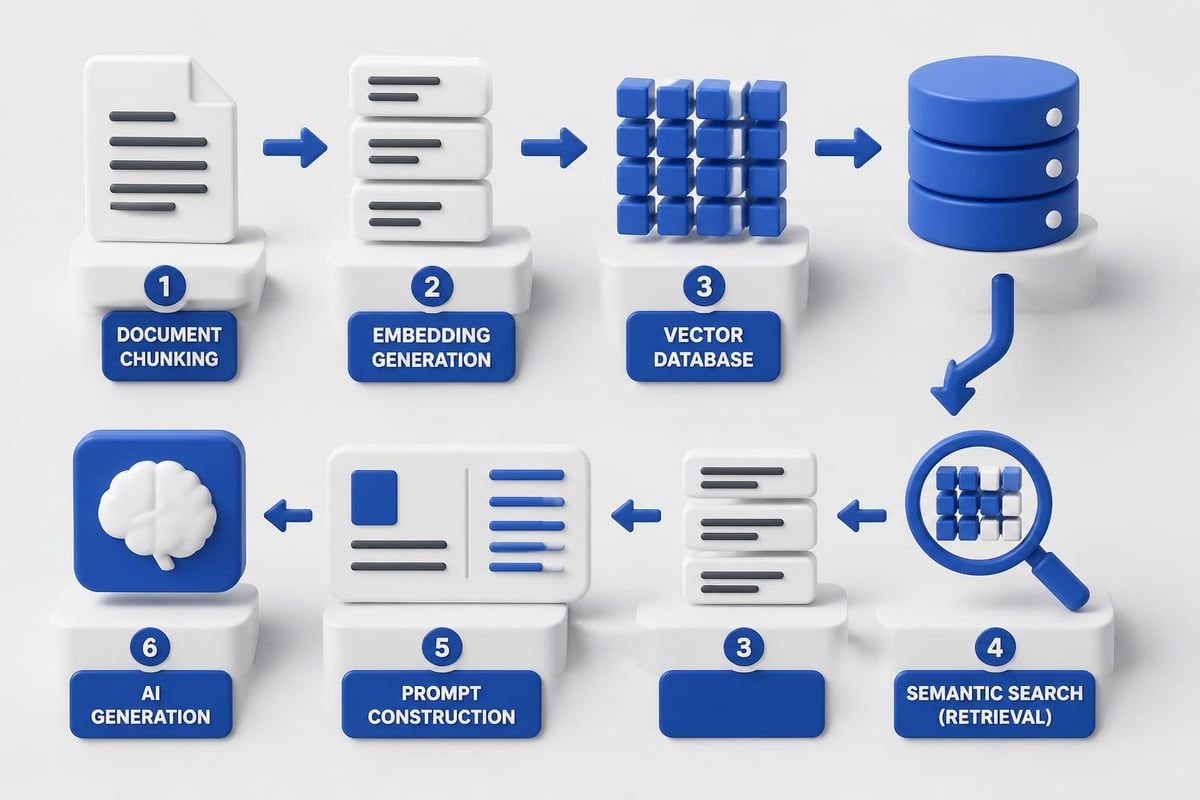
Retrieval-augmented generation transforms ai software development by grounding model outputs in your own data. Instead of hoping the model knows your domain, you retrieve relevant context and inject it into prompts.
Basic RAG workflow:
- Chunk your documents into semantic units (typically 500-1000 tokens)
- Generate embeddings using models like text-embedding-3-small
- Store vectors in a database (Pinecone, Weaviate, Qdrant)
- Query at runtime to find relevant chunks
- Construct prompts with retrieved context
from openai import OpenAI
import pinecone

client = OpenAI(api_key="your-key")

# Initialize vector database
pinecone.init(api_key="your-pinecone-key")
index = pinecone.Index("your-index")

def create_embedding(text):
    response = client.embeddings.create(
        model="text-embedding-3-small",
        input=text
    )
    return response.data[0].embedding

def retrieve_context(query, top_k=3):
    query_embedding = create_embedding(query)
    results = index.query(
        vector=query_embedding,
        top_k=top_k,
        include_metadata=True
    )
    return [match.metadata['text'] for match in results.matches]

def answer_with_rag(question):
    context_chunks = retrieve_context(question)
    context = "nn".join(context_chunks)

    prompt = f"""Based on the following context, answer the question.

Context:
{context}

Question: {question}

Answer:"""

    return client.chat.completions.create(
        model="gpt-4",
        messages=[{"role": "user", "content": prompt}]
    ).choices[0].message.content
This pattern scales to production with batching, async operations, and smarter chunking strategies. Monitor retrieval quality separately from generation quality to debug issues faster.
Testing and Quality Assurance
Traditional testing frameworks don't translate directly to ai software development. Non-deterministic outputs require different validation strategies.
Testing Approaches for AI Features
| Test Type | Method | Use Case |
|---|---|---|
| Snapshot testing | Compare against approved outputs | Detect unintended changes |
| Semantic similarity | Embeddings distance metrics | Verify meaning preservation |
| Structured output validation | JSON schema, regex patterns | Enforce format requirements |
| Human evaluation | Manual review of samples | Catch subtle quality issues |
| A/B testing | Compare prompt versions | Optimize performance |
Implement temperature=0 for deterministic outputs in tests. This won't catch all issues, but it makes tests reproducible. For critical features, combine automated checks with periodic human review.
Security testing deserves special attention. AI code security risks require additional layers of detection and remediation, especially when generating code or handling user inputs that become part of prompts.
Deployment and Monitoring
Deploy AI features with the same rigor as any backend service. Track latency, error rates, and costs as first-class metrics.
Essential monitoring metrics:
- Response time (p50, p95, p99)
- Token usage (prompt tokens, completion tokens)
- Error rates by type (rate limits, timeouts, invalid responses)
- Cost per request
- User satisfaction (thumbs up/down, feedback)
Set up alerting for cost spikes. A misconfigured loop can burn through API credits in minutes. Implement rate limiting at your application layer, not just relying on provider limits.
from datetime import datetime, timedelta
from collections import defaultdict

class RateLimiter:
    def __init__(self, max_requests, time_window_seconds):
        self.max_requests = max_requests
        self.time_window = timedelta(seconds=time_window_seconds)
        self.requests = defaultdict(list)

    def allow_request(self, user_id):
        now = datetime.now()
        cutoff = now - self.time_window

        # Remove old requests
        self.requests[user_id] = [
            req_time for req_time in self.requests[user_id]
            if req_time > cutoff
        ]

        # Check limit
        if len(self.requests[user_id]) >= self.max_requests:
            return False

        # Record request
        self.requests[user_id].append(now)
        return True
Production systems need distributed rate limiting, but this pattern shows the concept. Protect both your budget and your API quota.
Developers looking to master these production patterns should explore structured learning paths. Building certification-worthy projects forces you to implement real features, not just follow tutorials. The AI Developer Certification (Mammoth Club) focuses on shipping production-ready AI integrations using modern APIs and deployment workflows, exactly the skills needed for real-world ai software development.

Handling Common AI Development Challenges
Every ai software development project hits similar obstacles. Understanding common patterns accelerates debugging and improves architecture decisions.
Context Window Management
Language models have token limits (4K, 8K, 128K depending on model). Naive implementations hit these limits and fail. Strategies for managing context:
- Summarization: Condense previous conversation turns
- Sliding windows: Keep only recent context
- Hierarchical summarization: Maintain summaries at multiple levels
- Selective retrieval: Only include relevant context chunks
Track token counts in real-time and implement graceful degradation. Better to summarize old context than fail the request.
Managing Costs at Scale
API costs scale with usage in ways traditional infrastructure doesn't. A single feature might cost pennies per request, which becomes significant at volume.
Cost optimization techniques:
- Cache deterministic outputs aggressively
- Use smaller models for simple tasks
- Implement request batching where possible
- Set per-user or per-session spending limits
- Monitor and alert on cost anomalies
Test cost implications before scaling features. What works for 100 requests per day might not work for 100,000.

Best Practices for Team Collaboration
AI development best practices emphasize clear planning and iterative development, which become critical when multiple developers work on AI features.
Version control for AI projects needs additional components:
- Prompt templates in dedicated files or databases
- Model version pinning in configuration
- Test datasets for evaluation
- Expected outputs for regression testing
Create shared prompt libraries so team members reuse proven patterns. Document why prompts work, not just what they do. Future developers need context when debugging or optimizing.
Code Review for AI Features
Standard code review practices apply, plus AI-specific checks:
- Prompt injection protection: Validate and sanitize user inputs
- Error handling: Cover rate limits, timeouts, invalid responses
- Cost implications: Review token usage patterns
- Monitoring hooks: Ensure observability
- Fallback behavior: Define what happens when AI fails
Treat AI components as untrusted external services. Don't assume they'll work or produce valid outputs.
Staying Current in AI Development
The ai software development landscape changes faster than most technology domains. Models improve monthly, APIs evolve, and new tools emerge constantly.
Strategies for staying current:
- Build projects regularly to test new capabilities
- Follow release notes from major API providers
- Participate in developer communities
- Track token pricing changes
- Experiment with new models in sandbox environments
The relationship between AI and open-source development raises important questions about training data and licensing. Understanding these considerations helps you make informed choices about which tools to adopt.
Resources like AI agent tools directories provide comprehensive catalogs of frameworks and platforms, helping you discover new capabilities without constant research overhead.
Practical Implementation Workflows
Ship AI features incrementally. Start with a narrow use case, validate it works, then expand scope. This approach catches integration issues early and proves value before major investment.
Sample implementation timeline:
| Week | Milestone | Deliverable |
|---|---|---|
| 1 | Prototype with direct API | Working demo in development |
| 2 | Add error handling and tests | Reliable feature with test coverage |
| 3 | Implement monitoring and alerts | Observable production deployment |
| 4 | Optimize prompts and costs | Efficient, scalable feature |
Adjust timelines based on feature complexity, but maintain the pattern: working demo, reliability, observability, optimization.
For developers building AI-powered applications, this incremental approach reduces risk while building knowledge. Each iteration teaches something about production AI behavior that abstract tutorials miss.
Advanced Patterns and Architectures
Beyond basic API integration, advanced ai software development patterns enable more sophisticated applications.
Agent architectures let AI systems take actions beyond text generation:
- Tool calling: Let models invoke functions and APIs
- Multi-step reasoning: Chain operations with decision points
- Self-correction: Validate outputs and retry with adjustments
- Memory systems: Maintain state across interactions
Implementing agents requires careful design. Each tool the agent can call needs proper authorization, validation, and error handling. The model might call tools incorrectly, so wrap them in safe interfaces.
def create_agent_with_tools():
    tools = [
        {
            "type": "function",
            "function": {
                "name": "search_database",
                "description": "Search the product database",
                "parameters": {
                    "type": "object",
                    "properties": {
                        "query": {"type": "string"},
                        "limit": {"type": "integer"}
                    },
                    "required": ["query"]
                }
            }
        }
    ]

    def execute_tool_call(tool_name, arguments):
        if tool_name == "search_database":
            return safe_search_database(**arguments)
        raise ValueError(f"Unknown tool: {tool_name}")

    return tools, execute_tool_call
This pattern separates tool definitions from implementation, making it easier to add capabilities and enforce safety constraints.
Fine-tuning vs Prompt Engineering
Most ai software development projects don't need fine-tuning. Effective prompting and RAG handle 90% of use cases. Consider fine-tuning when:
- You need consistent formatting that prompts can't reliably achieve
- You have thousands of high-quality examples
- Response time matters more than flexibility
- Your domain has unique terminology or patterns
Fine-tuning requires infrastructure, data preparation, and evaluation frameworks. Start with prompting, measure where it falls short, then decide if fine-tuning addresses those gaps.
Understanding high-velocity AI development practices helps teams maintain speed while adding AI capabilities without sacrificing quality or reliability.
Security and Privacy Considerations
AI features introduce new attack vectors. User inputs become part of prompts, which can manipulate model behavior. Outputs might leak training data or generate harmful content.
Essential security practices:
- Sanitize all user inputs before including in prompts
- Implement content filtering on outputs
- Never include secrets or credentials in prompts
- Use separate API keys for development and production
- Log prompts and responses for audit trails
- Implement rate limiting per user
- Review data retention policies
Privacy matters especially when handling personal information. Many API providers train on data unless you opt out. Read terms of service carefully and configure accounts appropriately.
For applications handling sensitive data, consider self-hosted models or on-premise deployments. The convenience of managed APIs comes with data sharing trade-offs that aren't appropriate for all use cases.
Performance Optimization Strategies
Latency kills user experience. Language model API calls add hundreds of milliseconds to request times. Optimize aggressively.
Performance optimization checklist:
- Stream responses when possible to show progress
- Cache aggressively for repeated or similar queries
- Implement request batching for bulk operations
- Use faster models when quality difference is minimal
- Pre-compute common responses offline
- Parallelize independent API calls
Monitor p99 latency, not just averages. A few slow requests hurt users more than average latency suggests. Track which prompts consistently take longer and optimize those first.
Exploring AI coding practices that actually work reveals patterns that experienced developers use to maintain quality while leveraging AI tools effectively.
Modern ai software development requires balancing powerful AI capabilities with traditional software engineering discipline. Start with simple API integrations, implement proper error handling and monitoring, and iterate based on real usage data. AI Code Central provides practical tutorials and real-world projects that help developers build production-ready AI features, moving from concept to deployed application with confidence. Whether you're adding your first AI feature or scaling an intelligent system, focus on shipping working code that solves real problems.