
Artificial computing represents the computational infrastructure and algorithmic frameworks that enable machines to perform intelligent tasks. Unlike traditional computing that follows explicit instructions, artificial computing uses neural networks, deep learning models, and statistical inference to process data, recognize patterns, and make autonomous decisions. For developers building AI-powered applications in 2026, understanding artificial computing fundamentals is essential for implementing everything from recommendation engines to natural language processors. This foundation determines how effectively you can integrate AI capabilities into production systems, optimize model performance, and scale your applications under real-world conditions.
What Makes Artificial Computing Different
Traditional computing executes deterministic algorithms. You write a function, it processes input, and returns predictable output every time. Artificial computing operates differently. Instead of hardcoding logic, you train models on data to learn patterns and relationships.
The core distinction lies in how problems get solved. A traditional search function uses exact string matching or predefined rules. An AI-powered search system trained through artificial computing learns semantic relationships, handles typos, understands context, and improves with usage data. This shift from rule-based to pattern-based processing defines modern AI development.
Core Components of Artificial Computing Systems
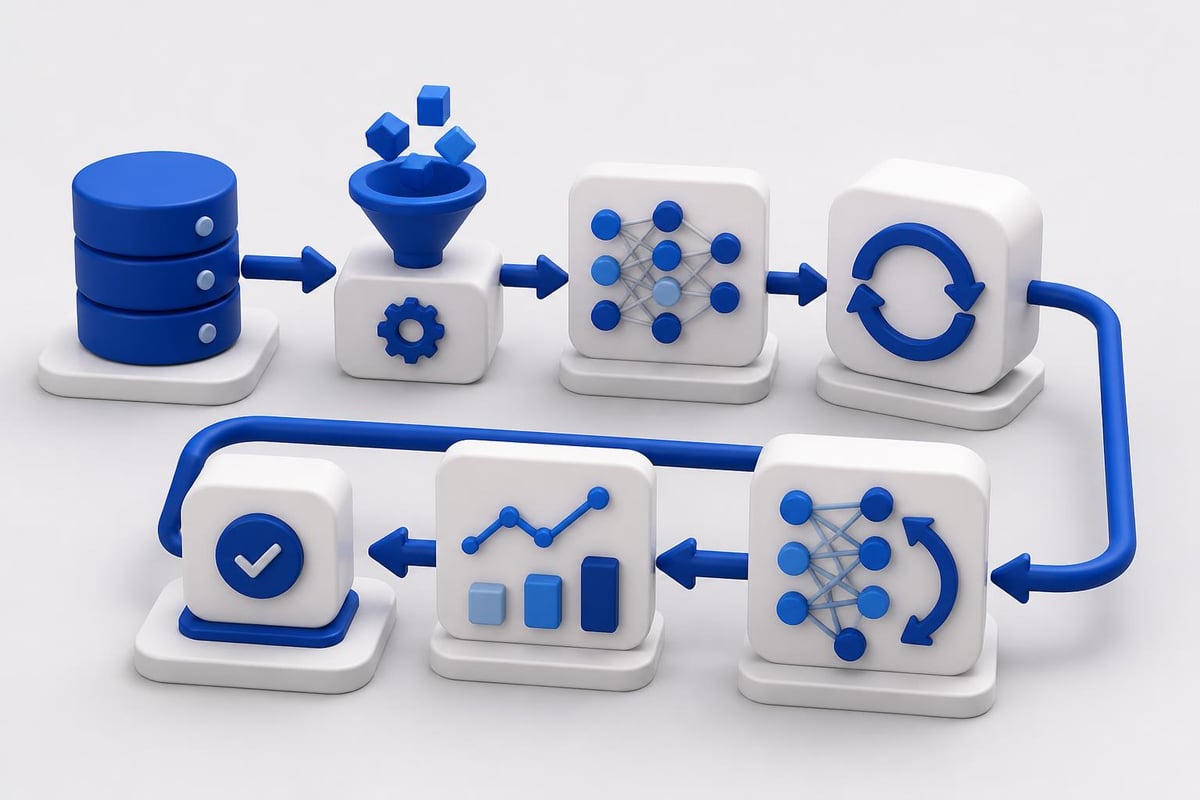
Every artificial computing implementation requires specific technical components working together:
- Training data pipelines that clean, normalize, and prepare datasets
- Neural network architectures designed for your specific task (classification, generation, prediction)
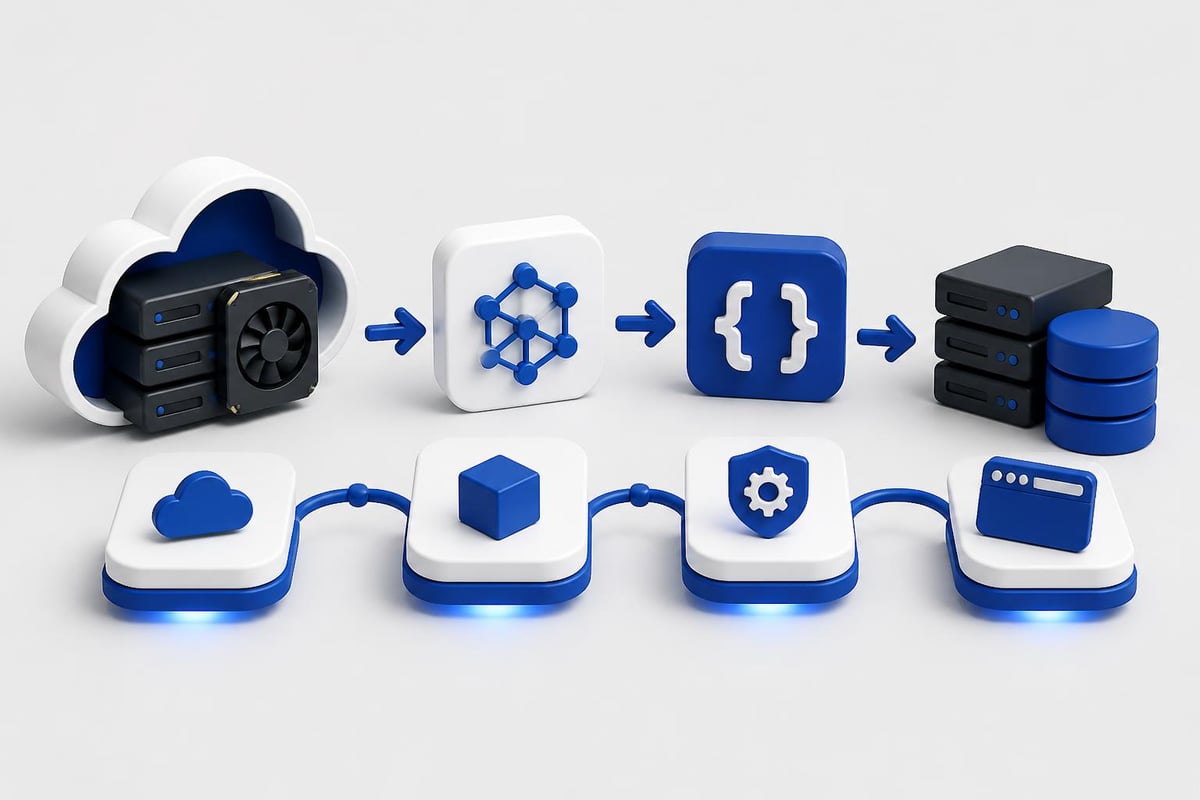
- Compute infrastructure with GPU or TPU acceleration for matrix operations
- Model evaluation frameworks that measure accuracy, precision, and real-world performance
- Deployment systems that serve predictions through APIs or embedded inference
The hardware layer matters significantly. AI computing systems rely on specialized processors that handle parallel operations efficiently. CPUs process instructions sequentially, while GPUs execute thousands of calculations simultaneously, making them ideal for the matrix multiplications central to neural network training.
| Component | Traditional Computing | Artificial Computing |
|---|---|---|
| Processing Model | Sequential instructions | Parallel matrix operations |
| Problem Solving | Explicit algorithms | Pattern learning from data |
| Hardware | CPU-optimized | GPU/TPU-optimized |
| Improvement Method | Code updates | Additional training data |
| Output Predictability | Deterministic | Probabilistic |
Building Your First Artificial Computing Workflow
Start with a concrete problem that benefits from pattern recognition rather than rule-based logic. Image classification, text sentiment analysis, and time series forecasting all work well as initial projects. The workflow follows consistent steps regardless of your specific application.
First, define your task clearly. What input will your model receive? What output should it produce? Classification tasks assign categories. Regression tasks predict numerical values. Generation tasks create new content. This clarity drives every subsequent decision about architecture and training approach.
Setting Up the Development Environment
Your local machine needs specific dependencies before you can implement artificial computing projects:
# Install core artificial computing libraries
pip install torch torchvision torchaudio --index-url https://download.pytorch.org/whl/cu118
pip install transformers datasets accelerate
pip install numpy pandas scikit-learn matplotlib
PyTorch and TensorFlow represent the two dominant frameworks for artificial computing in 2026. PyTorch offers more intuitive debugging and dynamic computation graphs. TensorFlow provides better production deployment tools and mobile optimization. Most developers learn PyTorch first for its developer experience, then add TensorFlow skills when production requirements demand it.
Data preprocessing consumes more time than model training in real projects. You'll spend hours cleaning datasets, handling missing values, normalizing features, and splitting train/validation/test sets. Artificial intelligence applications require high-quality data more than complex architectures.
Training a Production Model
import torch
import torch.nn as nn
from torch.utils.data import DataLoader, TensorDataset

# Define a simple neural network for classification
class ArtificialComputingModel(nn.Module):
    def __init__(self, input_size, hidden_size, num_classes):
        super(ArtificialComputingModel, self).__init__()
        self.fc1 = nn.Linear(input_size, hidden_size)
        self.relu = nn.ReLU()
        self.dropout = nn.Dropout(0.3)
        self.fc2 = nn.Linear(hidden_size, num_classes)

    def forward(self, x):
        out = self.fc1(x)
        out = self.relu(out)
        out = self.dropout(out)
        out = self.fc2(out)
        return out

# Initialize model, loss, and optimizer
model = ArtificialComputingModel(input_size=784, hidden_size=256, num_classes=10)
criterion = nn.CrossEntropyLoss()
optimizer = torch.optim.Adam(model.parameters(), lr=0.001)

# Training loop
def train_model(model, train_loader, epochs=10):
    model.train()
    for epoch in range(epochs):
        total_loss = 0
        for batch_idx, (data, target) in enumerate(train_loader):
            optimizer.zero_grad()
            output = model(data)
            loss = criterion(output, target)
            loss.backward()
            optimizer.step()
            total_loss += loss.item()

        avg_loss = total_loss / len(train_loader)
        print(f'Epoch {epoch+1}/{epochs}, Loss: {avg_loss:.4f}')
This code demonstrates the fundamental artificial computing training loop. You feed data through the network, calculate prediction error, compute gradients via backpropagation, and update weights to minimize loss. The process repeats thousands or millions of times until the model converges.
Hardware Acceleration for Artificial Computing
CPU training works for small datasets and simple models, but production artificial computing requires GPU acceleration. A task taking 48 hours on CPU might complete in 2 hours on a modern GPU. The difference compounds as datasets grow and models increase in complexity.
GPU-accelerated AI computing has become standard practice because neural networks perform identical operations across millions of parameters simultaneously. GPUs excel at exactly this workload through their thousands of small, efficient cores designed for parallel processing.
Cloud vs Local Hardware
| Approach | Best For | Cost Profile | Flexibility |
|---|---|---|---|
| Local GPU | Rapid iteration, small models | High upfront, low ongoing | Limited by hardware |
| Cloud GPU (AWS, GCP, Azure) | Large-scale training, experimentation | Pay per hour | Unlimited scaling |
| Serverless AI (Modal, Replicate) | Production inference | Pay per request | Automatic scaling |
For developers just starting with artificial computing, cloud platforms offer the most practical path. You can spin up a GPU instance, train your model, save the weights, and shut down the instance, paying only for actual compute time. This approach avoids the $1,500-$3,000 cost of a local GPU while providing access to cutting-edge hardware.
# Example using cloud GPU with minimal code changes
device = torch.device('cuda' if torch.cuda.is_available() else 'cpu')
model = model.to(device)

# Your training loop remains identical
for data, target in train_loader:
    data, target = data.to(device), target.to(device)
    # Rest of training code unchanged
The .to(device) pattern moves tensors to GPU memory automatically. PyTorch handles all underlying CUDA operations, letting you focus on model architecture and training logic rather than low-level hardware management.
Model Architectures in Artificial Computing
Different problems require different neural network architectures. Choosing the right structure for your task dramatically impacts both accuracy and training efficiency. The three primary categories dominate artificial computing applications in 2026.
Convolutional Neural Networks (CNNs) excel at image processing, object detection, and any task involving spatial relationships. They use convolution operations to detect features like edges, textures, and patterns while maintaining spatial hierarchy. If your input is images or video, start with CNN architectures.
Recurrent Neural Networks (RNNs) and their modern variants like LSTMs and GRUs process sequential data. Text analysis, time series prediction, and audio processing all benefit from RNN architectures that maintain internal state across sequences. Transformers have largely replaced RNNs for language tasks, but RNNs remain efficient for specific use cases.
Transformer models represent the current state of artificial computing for language understanding and generation. Attention mechanisms let these models weigh the importance of different input elements dynamically. GPT-4, Claude, and other large language models all build on transformer architectures.
Implementing Transfer Learning
You rarely train large models from scratch. Transfer learning lets you start with pretrained weights and fine-tune for your specific task. This approach reduces training time from weeks to hours while improving accuracy on small datasets.
from transformers import AutoModelForSequenceClassification, AutoTokenizer, Trainer, TrainingArguments

# Load pretrained model for artificial computing task
model_name = "distilbert-base-uncased"
model = AutoModelForSequenceClassification.from_pretrained(model_name, num_labels=2)
tokenizer = AutoTokenizer.from_pretrained(model_name)

# Fine-tune on your specific dataset
training_args = TrainingArguments(
    output_dir='./results',
    num_train_epochs=3,
    per_device_train_batch_size=16,
    warmup_steps=500,
    weight_decay=0.01,
    logging_dir='./logs',
)

trainer = Trainer(
    model=model,
    args=training_args,
    train_dataset=train_dataset,
    eval_dataset=eval_dataset,
)

trainer.train()
The Hugging Face transformers library simplifies artificial computing implementation for NLP tasks. You get access to thousands of pretrained models, standardized APIs, and production-ready inference pipelines. This ecosystem accelerates development significantly compared to building everything from scratch.
For developers looking to formalize their artificial computing skills and build production-ready AI systems, structured learning paths help organize the landscape. The AI Developer Certification (Mammoth Club) focuses specifically on integrating OpenAI, Claude, and modern AI APIs into real applications, covering the prompt engineering and backend workflows that bridge artificial computing concepts with shipped products.

Deploying Artificial Computing Models
Training a model represents only half the work. Production deployment requires additional engineering to serve predictions reliably, scale under load, and maintain model performance over time. Your deployment strategy depends on latency requirements, request volume, and infrastructure constraints.
API Wrapper Pattern
The most common deployment approach wraps your trained model in a REST API. Clients send input data via HTTP POST requests and receive predictions in the response. This pattern works for most artificial computing applications.
from flask import Flask, request, jsonify
import torch

app = Flask(__name__)

# Load trained model
model = torch.load('model_weights.pth')
model.eval()

@app.route('/predict', methods=['POST'])
def predict():
    data = request.json['input']

    # Preprocess input
    tensor_input = preprocess(data)

    # Run inference
    with torch.no_grad():
        output = model(tensor_input)
        prediction = output.argmax(dim=1).item()

    return jsonify({
        'prediction': prediction,
        'confidence': float(output.max())
    })

if __name__ == '__main__':
    app.run(host='0.0.0.0', port=5000)
This Flask endpoint handles artificial computing inference requests. The torch.no_grad() context disables gradient computation, reducing memory usage and speeding up inference. For production systems, you'd add authentication, rate limiting, input validation, and error handling.
Optimization Techniques
Raw models often run too slowly for production latency requirements. Several optimization techniques reduce inference time without sacrificing accuracy:
- Model quantization converts 32-bit floats to 8-bit integers, reducing model size by 75% and speeding inference 2-4x
- ONNX export creates optimized runtime versions that run on specialized inference engines
- Batch processing groups multiple requests together to maximize GPU utilization
- Model distillation trains smaller models to mimic larger ones, trading slight accuracy for major speed gains
# Example of model quantization for faster inference
import torch.quantization

# Quantize the model
model_quantized = torch.quantization.quantize_dynamic(
    model, {torch.nn.Linear}, dtype=torch.qint8
)

# Quantized model runs 2-3x faster with minimal accuracy loss
Production artificial computing systems often combine multiple optimization techniques. You might quantize a distilled model, export it to ONNX, and serve it through a batched inference pipeline. Each optimization compounds, creating systems that serve predictions in milliseconds rather than seconds.
Monitoring and Maintaining AI Systems
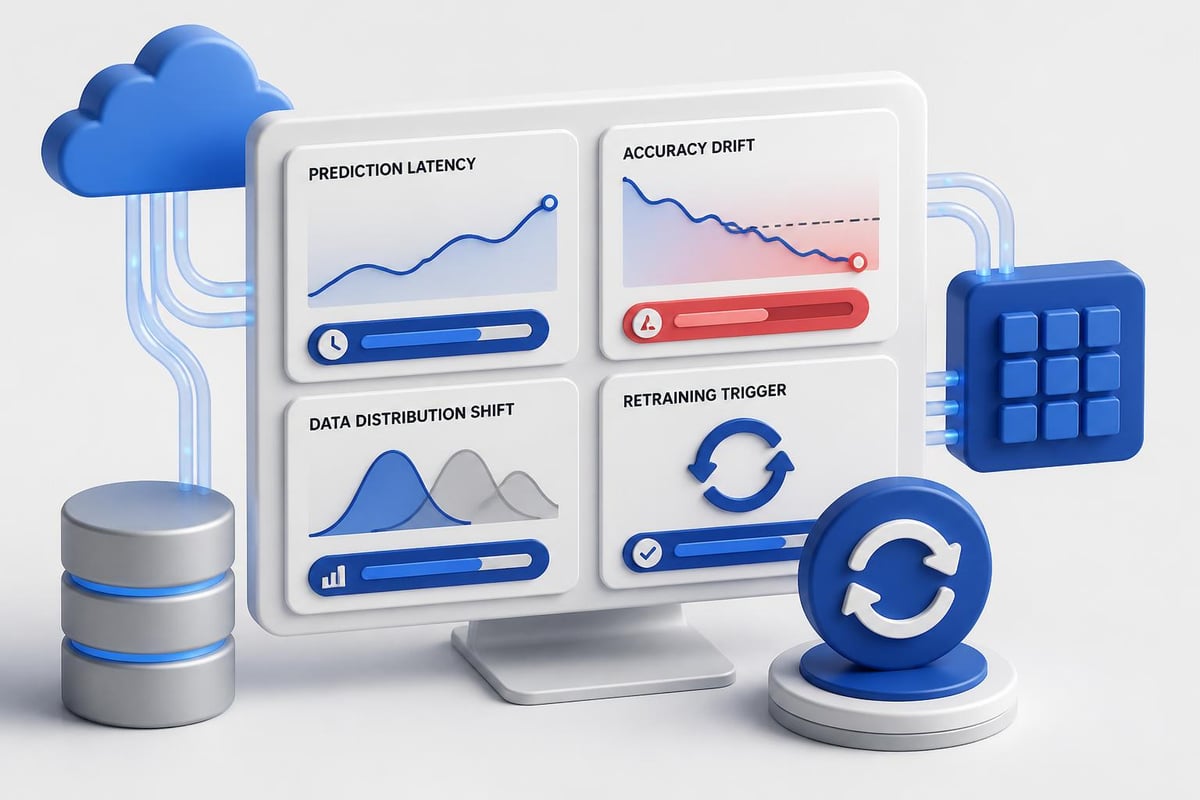
Models degrade over time as real-world data distributions shift. Your artificial computing system needs monitoring infrastructure to detect performance degradation before it impacts users. This observability layer tracks multiple dimensions of model health.
Prediction latency measures how long inference takes. Increases indicate infrastructure problems or inefficient batching. Set alerts at your p95 and p99 latency thresholds to catch performance issues early.
Accuracy drift occurs when model performance decreases on new data. Compare predictions against ground truth labels from a sample of production traffic. Significant drops trigger model retraining workflows.
Input distribution shifts happen when incoming data differs from training data. Track feature statistics over time and alert when values exceed expected ranges. This often indicates data quality issues or changing user behavior.
# Simple monitoring for artificial computing predictions
import time
from collections import deque
import numpy as np

class ModelMonitor:
    def __init__(self, window_size=1000):
        self.latencies = deque(maxlen=window_size)
        self.predictions = deque(maxlen=window_size)

    def log_prediction(self, latency, prediction, confidence):
        self.latencies.append(latency)
        self.predictions.append({
            'pred': prediction,
            'conf': confidence,
            'timestamp': time.time()
        })

    def get_metrics(self):
        return {
            'p50_latency': np.percentile(self.latencies, 50),
            'p95_latency': np.percentile(self.latencies, 95),
            'avg_confidence': np.mean([p['conf'] for p in self.predictions]),
            'total_predictions': len(self.predictions)
        }

monitor = ModelMonitor()

# In your prediction endpoint
start_time = time.time()
prediction, confidence = run_inference(input_data)
latency = time.time() - start_time

monitor.log_prediction(latency, prediction, confidence)
This monitoring code tracks basic metrics for artificial computing systems. Production implementations integrate with observability platforms like Prometheus, Datadog, or CloudWatch for centralized dashboards and alerting.
Common Artificial Computing Challenges
Every developer building AI systems encounters similar obstacles. Understanding these challenges helps you debug issues faster and design more robust architectures from the start.
Overfitting and Generalization
Models that memorize training data rather than learning generalizable patterns perform poorly on new inputs. Cognitive computing systems must balance fitting training data with maintaining performance on unseen examples.
Prevention techniques:
- Split data into train/validation/test sets and never train on test data
- Use dropout layers to prevent co-adaptation of neurons
- Apply L1/L2 regularization to penalize large weights
- Collect more diverse training data covering edge cases
- Implement early stopping when validation loss stops improving
The validation set acts as your artificial computing reality check. If training accuracy reaches 98% but validation accuracy stays at 75%, you're overfitting. Stop training earlier, increase regularization, or simplify your model architecture.
Data Quality Issues
Garbage in, garbage out applies doubly to artificial computing. Models learn from data patterns, including bugs, biases, and errors in your dataset. Cleaning data takes time but prevents cascade failures in production.
Check for these common data problems:
- Missing values that need imputation or removal
- Duplicate records inflating certain patterns
- Label errors from annotation mistakes or data entry bugs
- Class imbalance where some categories have 100x more examples than others
- Distribution shifts between train and test sets
import pandas as pd

# Basic data quality checks for artificial computing datasets
df = pd.read_csv('training_data.csv')

# Check for missing values
print(f"Missing values:n{df.isnull().sum()}")

# Check for duplicates
duplicates = df.duplicated().sum()
print(f"Duplicate records: {duplicates}")

# Check class balance
print(f"Class distribution:n{df['label'].value_counts()}")

# Statistical summary
print(f"Feature statistics:n{df.describe()}")
Running these checks before training saves hours of debugging mysterious model failures. Bad data creates bad models regardless of architecture complexity or training time.
Scaling Artificial Computing Infrastructure
Small projects run fine on single GPUs and simple API servers. As usage grows, you need distributed training, load balancing, and fault tolerance. Understanding AI infrastructure requirements helps you plan scaling strategies before hitting performance walls.
Distributed training splits model training across multiple GPUs or machines. PyTorch's DistributedDataParallel (DDP) and Horovod handle the synchronization and gradient aggregation automatically. This approach cuts training time linearly with additional GPUs for most architectures.
import torch.distributed as dist
from torch.nn.parallel import DistributedDataParallel as DDP

# Initialize distributed training
dist.init_process_group(backend='nccl')
local_rank = int(os.environ['LOCAL_RANK'])
torch.cuda.set_device(local_rank)

# Wrap model for distributed artificial computing
model = model.to(local_rank)
model = DDP(model, device_ids=[local_rank])

# Training loop works identically
# DDP handles gradient synchronization across GPUs
Production inference scales differently than training. You need multiple replicas behind a load balancer, health checks, circuit breakers, and request queuing. Kubernetes has become the standard orchestration platform for artificial computing deployments at scale.
Container-based deployment packages your model, dependencies, and inference server into a Docker image. This image runs identically across development, staging, and production environments, eliminating "works on my machine" issues.
For developers building real AI applications, resources like AI Code Central provide tutorials and projects that go beyond theory. Learning artificial intelligence for development through practical implementation accelerates your progress from academic understanding to shipping production systems.
Artificial computing transforms how we build software by enabling machines to learn from data rather than follow explicit instructions. The development workflow spans data preparation, model architecture selection, training optimization, and production deployment. Each phase requires specific technical skills, from GPU programming to API design to distributed systems engineering. Start with small projects using transfer learning and pretrained models, then expand into custom architectures as you master the fundamentals. AI Code Central offers practical tutorials and real-world projects to help you build, ship, and scale artificial computing applications using modern tools and production-ready workflows.