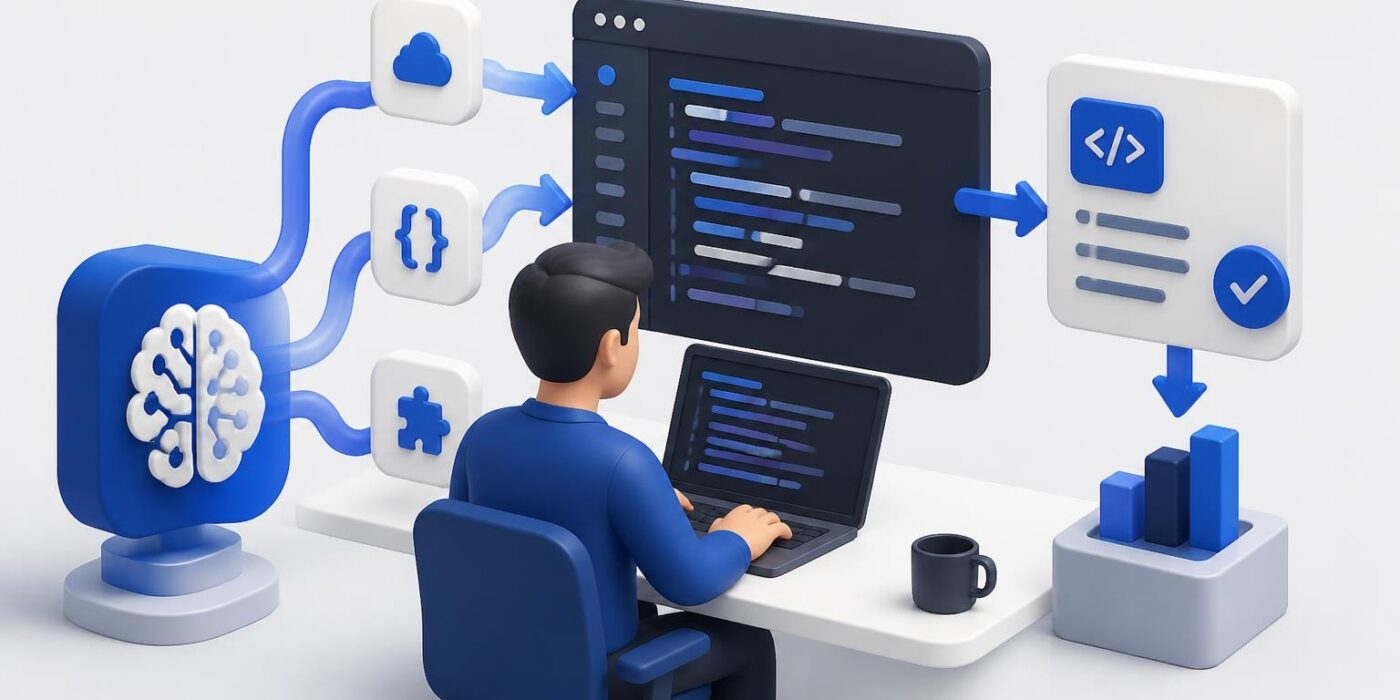
Coding by AI has shifted from experimental novelty to production reality. Developers now generate thousands of lines of code daily using AI assistants, transforming how software gets built and shipped. This isn't about replacing developers but augmenting their capabilities with tools that handle boilerplate, suggest optimizations, and accelerate implementation. The landscape includes everything from inline code completion to autonomous agents that build entire features from natural language specifications. Understanding how to integrate these tools into your workflow while maintaining code quality and security is now a core developer skill.
How AI Code Generation Works
AI code generation relies on large language models trained on billions of lines of public code repositories. These models learn patterns, syntax, and common implementations across programming languages. When you provide a natural language prompt or partial code, the model predicts the most likely completion based on its training data.
The process starts with tokenization. Your input gets broken into tokens (subwords or characters) that the model can process. The transformer architecture then applies attention mechanisms to understand context and relationships between tokens. Finally, the model generates output tokens that form code suggestions.
Implementation Architecture
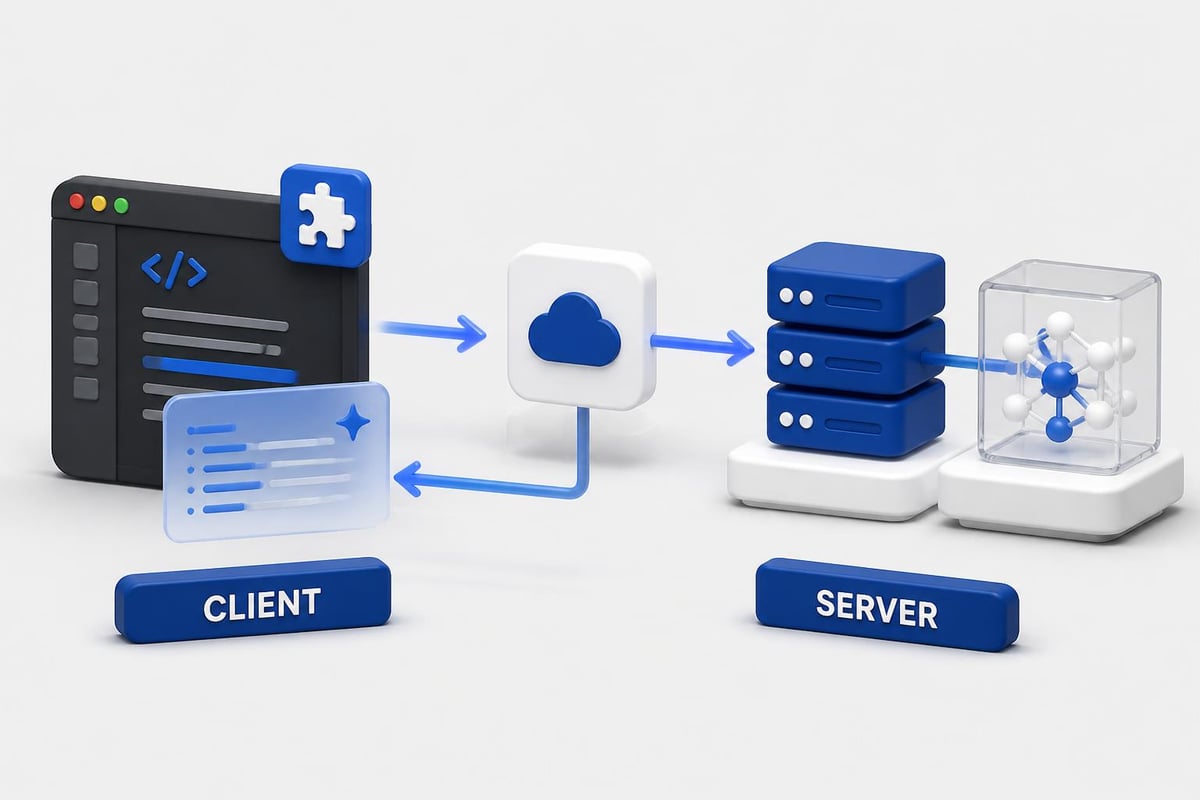
Most AI coding tools follow a client-server pattern:
- Client layer: IDE extension or terminal interface that captures your context
- API layer: Sends sanitized code snippets and prompts to the model
- Model layer: Processes input and generates code suggestions
- Response handler: Formats and displays suggestions in your development environment
The best implementations also include a feedback loop where you can accept, reject, or modify suggestions. This data helps improve future recommendations, though privacy-conscious developers should verify what gets sent to external servers.
Setting Up Your First AI Coding Workflow
Start with a clear use case rather than trying to AI-generate everything at once. Pick a specific task like writing API endpoints, generating test cases, or creating database schemas.
Initial Setup Steps:
- Choose a tool that matches your stack (GitHub Copilot for general use, AWS CodeWhisperer for cloud workflows, Claude for complex reasoning)
- Install the IDE extension or CLI tool
- Configure API keys and authentication
- Set code context preferences (how much surrounding code the AI sees)
- Define your quality gates (linting, testing, security scanning)
Here's a basic example using OpenAI's API for code generation:
import openai

def generate_function(description, language="python"):
    response = openai.ChatCompletion.create(
        model="gpt-4",
        messages=[
            {"role": "system", "content": f"You are an expert {language} developer. Generate clean, production-ready code."},
            {"role": "user", "content": f"Write a function that {description}"}
        ],
        temperature=0.2
    )
    return response.choices[0].message.content
The temperature parameter (0.2) keeps outputs deterministic and focused. Higher values increase creativity but reduce reliability for coding tasks.
Context Management
Coding by AI improves dramatically when you provide relevant context. Modern tools can access your entire codebase, but that doesn't mean they should. Limit context to relevant files and functions to reduce noise and improve suggestion quality.
Configure your tool to include:
- Current file and cursor position
- Imported modules and dependencies
- Related functions or classes
- Project-specific conventions from a style guide or documentation
Avoid sending sensitive data like API keys, credentials, or proprietary business logic to cloud-based AI services. Use environment variables and configuration files that get excluded from context.
Practical Applications Across Development Stages
Different development phases benefit from coding by AI in specific ways. Understanding where AI adds the most value helps you integrate it effectively without creating dependencies on generated code you don't understand.
| Development Stage | AI Application | Time Savings | Risk Level |
|---|---|---|---|
| Prototyping | Generate full features from specs | 60-70% | Low |
| Implementation | Autocomplete and boilerplate | 30-40% | Medium |
| Testing | Create unit and integration tests | 50-60% | Low |
| Documentation | Generate API docs and comments | 40-50% | Low |
| Debugging | Suggest fixes for error messages | 20-30% | Medium |
| Refactoring | Modernize legacy code patterns | 30-40% | High |
Building API Endpoints
When building REST APIs, AI excels at generating standard CRUD operations. You provide the data model, and it produces the routes, validation, and database queries.
Example prompt for FastAPI:
"Create a FastAPI endpoint that accepts a POST request with username and email, validates both fields, creates a new user in PostgreSQL using SQLAlchemy, and returns the user object with a 201 status code. Include error handling for duplicate usernames."
The AI generates not just the route handler but also the Pydantic models, database operations, and exception handling. You still need to review for security issues like SQL injection prevention and proper input sanitization.
Test Generation
Testing is where coding by AI delivers immediate value with minimal risk. Generate comprehensive test suites that cover edge cases you might overlook.
For a function that processes payments, ask the AI to:
"Generate pytest tests for the process_payment function covering successful payment, insufficient funds, invalid card, network timeout, and concurrent payment attempts. Include fixtures for test data and mock the payment gateway."
The output includes setup, teardown, parameterized tests, and assertion statements. Review the test cases to ensure they match your actual business requirements.
Security Considerations and Code Review
Nearly half of AI-generated code contains security flaws, according to research from Veracode. This doesn't mean you should avoid AI coding tools, but it requires integrating security checks into your workflow.
Critical security review points:
- Input validation and sanitization
- Authentication and authorization logic
- SQL injection and XSS prevention
- Proper error handling without information leakage
- Secure credential management
- Rate limiting and resource constraints
Run generated code through static analysis tools like Bandit for Python, ESLint security plugins for JavaScript, or language-agnostic tools like SonarQube. These catch common vulnerabilities before code reaches production.
Code Review Process
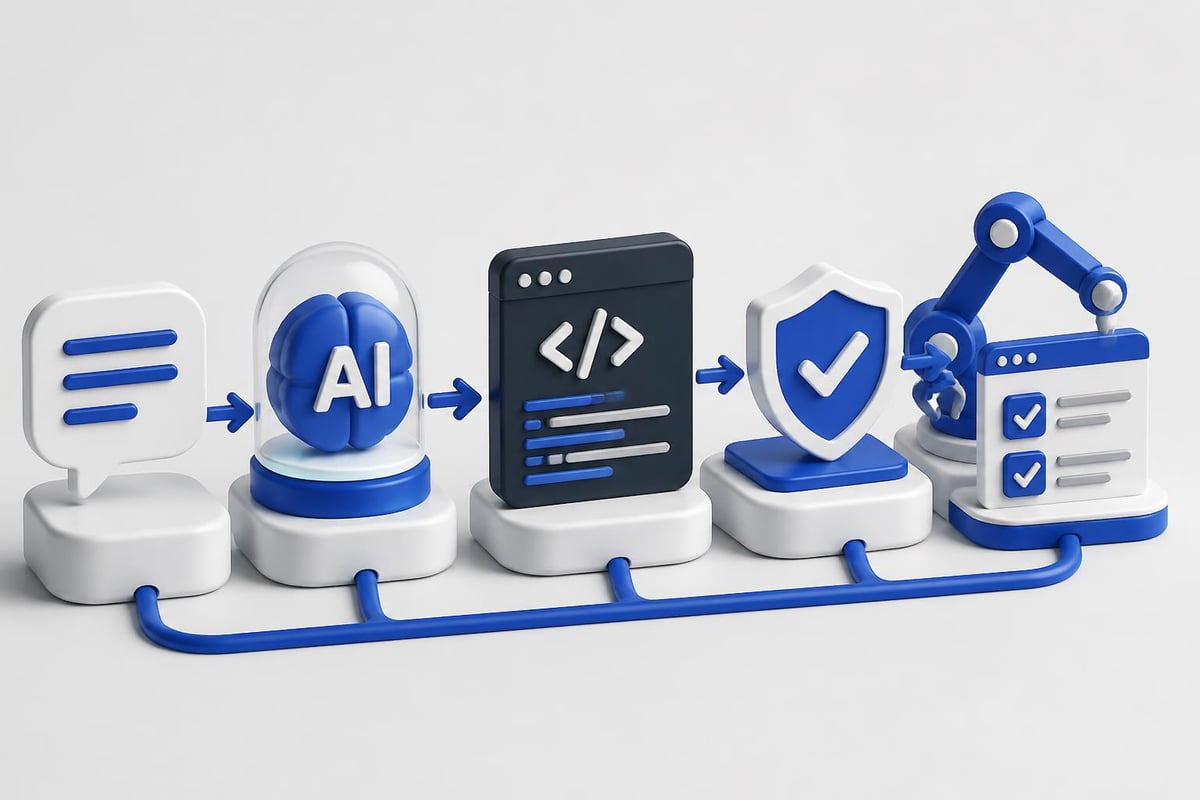
Establish a multi-layer review process for AI-generated code:
- Immediate review: Read the generated code before accepting it
- Local testing: Run in development environment with test data
- Automated scanning: Pass through linters and security scanners
- Peer review: Have another developer review AI-generated sections
- Integration testing: Verify behavior with real system dependencies
Never deploy AI-generated code that you don't fully understand. If you can't explain what a code block does and why it works, either study it until you can or rewrite it manually.
Performance Optimization With AI Assistance
AI coding tools help identify performance bottlenecks and suggest optimizations. They analyze your code against patterns in high-performance implementations from their training data.
For database queries, AI can:
- Suggest index additions based on query patterns
- Rewrite N+1 queries to use joins or batch loading
- Recommend caching strategies for frequently accessed data
- Identify slow operations and propose async alternatives
Example optimization request:
"Review this Django view and suggest performance improvements. It loads all user records and their related posts, then filters in Python. Database is PostgreSQL."
The AI might suggest using select_related() for the foreign key relationship, adding only() to fetch specific fields, implementing pagination, or caching the results.
Real-World Performance Gains
Nvidia tripled its code output by integrating AI coding tools across 30,000+ engineers. This demonstrates that coding by AI scales effectively in large organizations when implemented with proper guardrails and training.
The productivity gains come from:
- Faster implementation of well-understood patterns
- Reduced context switching when working across multiple languages
- Automated generation of boilerplate and configuration
- Quick scaffolding of new projects and modules
These benefits compound when combined with AI for programming best practices that emphasize understanding over speed.
Integration With Modern Development Tools
Coding by AI works best when integrated into your existing toolchain rather than replacing it. Connect AI assistants to your version control, CI/CD pipelines, and project management systems.
IDE Integration Approaches
| Tool | Integration Method | Best For | Learning Curve |
|---|---|---|---|
| GitHub Copilot | Native extension | General development | Low |
| Cursor | AI-native editor | Greenfield projects | Medium |
| Amazon CodeWhisperer | AWS cloud workflows | Medium | |
| Tabnine | Local or cloud | Privacy-sensitive work | Low |
| Claude Code | API integration | Complex reasoning | High |
Choose based on your security requirements, budget, and existing tool ecosystem. For maximum flexibility, use tools with API access that let you build custom integrations.
CI/CD Pipeline Integration
Add AI-powered code review as a pipeline stage. Before human review, run automated checks that use AI to:
- Detect code smells and anti-patterns
- Suggest refactoring opportunities
- Verify test coverage for new code
- Generate documentation for changed functions
- Check for security vulnerabilities
This pre-filters obvious issues so human reviewers can focus on architecture and business logic.
Training AI Models on Your Codebase
For teams with proprietary frameworks or domain-specific requirements, fine-tuning an AI model on your codebase improves suggestion quality. This works for organizations with substantial codebases (100k+ lines) and consistent coding patterns.
Fine-tuning process:
- Extract code samples representing your patterns and conventions
- Clean and anonymize data (remove credentials, customer data)
- Format as training examples with input/output pairs
- Fine-tune a base model using your dataset
- Evaluate on held-out test cases
- Deploy as a private endpoint for your team
Open-source models like CodeLlama or StarCoder can be fine-tuned on your infrastructure without sending code to external services. This addresses privacy concerns while maintaining quality.
For developers looking to build practical AI skills beyond basic code generation, structured learning paths help bridge the gap between using AI tools and understanding how they work. AI Developer Certification (Mammoth Club) focuses on building production applications with modern AI APIs, covering everything from prompt engineering to backend integration and deployment workflows.

Advanced Patterns and Autonomous Agents
The latest development in coding by AI involves autonomous agents that can handle multi-step tasks with minimal supervision. These systems break down complex requirements into subtasks, execute them, and validate results.
Anthropic’s Claude Opus 4.5 demonstrates this capability by planning implementations, writing code, running tests, and debugging failures automatically. The model can interact with development tools through computer control APIs.
Agent Architecture
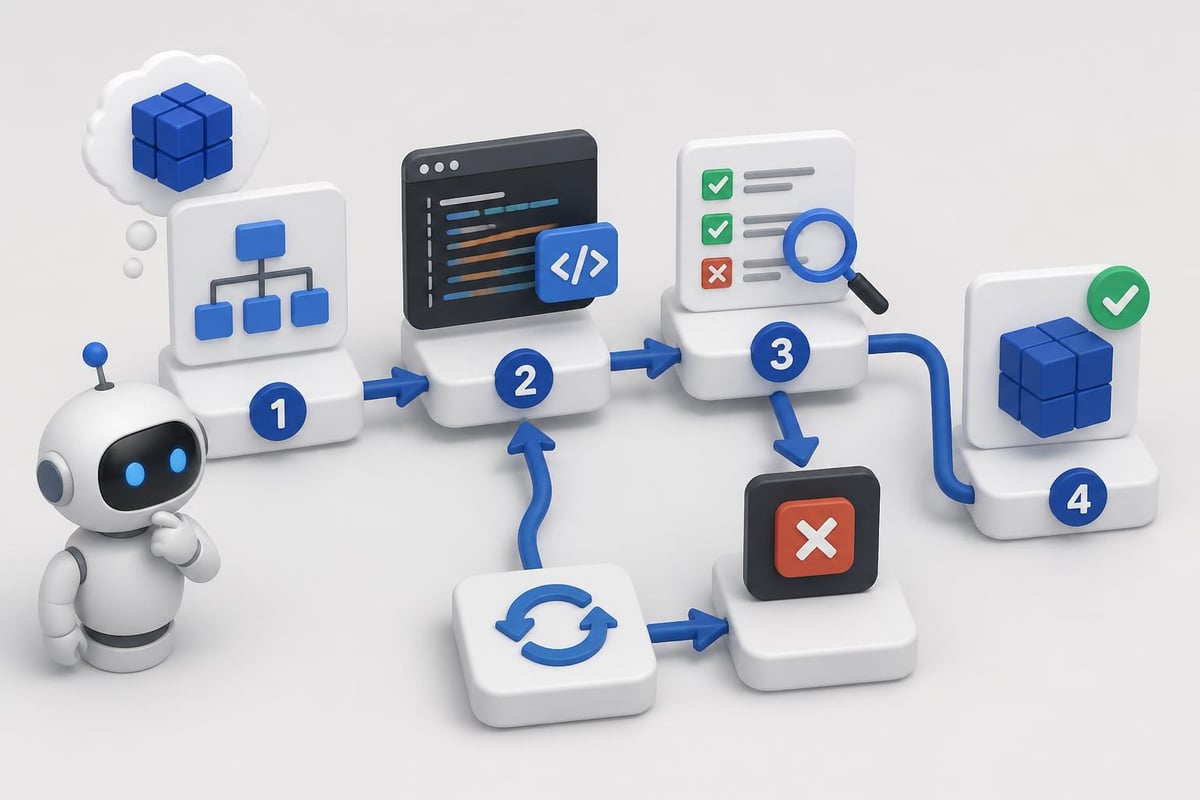
An autonomous coding agent typically includes:
- Planning module: Breaks requirements into implementation steps
- Code generation: Writes functions and modules for each step
- Execution environment: Runs code in a sandboxed container
- Validation layer: Tests outputs against requirements
- Refinement loop: Debugs failures and regenerates improved versions
This architecture handles tasks like "build a REST API for a todo list with user authentication, rate limiting, and PostgreSQL storage" with minimal human input beyond the initial specification.
When to Use Autonomous Agents
Autonomous agents work best for:
- Proof-of-concept implementations
- Internal tools with flexible requirements
- Data processing pipelines with clear inputs/outputs
- Repetitive feature implementations across similar projects
Avoid them for:
- Security-critical systems
- Customer-facing production code (without extensive review)
- Novel algorithms or unique business logic
- Systems requiring specific performance characteristics
Language and Framework Coverage
Coding by AI performs differently across programming languages based on training data availability and community adoption. Understanding these differences helps set realistic expectations.
Strong AI support (abundant training data):
- Python: Excellent for data science, web backends, automation
- JavaScript/TypeScript: Strong for frontend, Node.js, React
- Java: Good for enterprise applications, Android
- C#: Solid for .NET ecosystem, Unity
- Go: Growing support for microservices, cloud tools
Moderate AI support:
- Rust: Improving but less training data than older languages
- Swift: Good for iOS but limited server-side examples
- Kotlin: Android coverage strong, other uses variable
- PHP: Legacy code patterns well-represented
Emerging support:
- Zig, V, Nim: Limited training data, basic patterns only
- Domain-specific languages: Highly variable quality
For code of AI applications and artificial intelligence based projects, Python and JavaScript receive the strongest AI assistance due to their dominance in AI/ML ecosystems.
Measuring Productivity Impact
Track metrics to quantify how coding by AI affects your development workflow. Focus on outcomes rather than vanity metrics like "lines of code generated."
Useful metrics:
- Time from feature specification to working implementation
- Bug density in AI-generated vs. manually written code
- Test coverage percentage for generated code
- Developer satisfaction and cognitive load reduction
- Code review iterations required
- Time spent on boilerplate vs. business logic
Set up A/B tests where some developers use AI tools and others don't for similar tasks. Compare delivery speed, bug rates, and code maintainability over weeks or months.
Realistic Productivity Expectations
Expect 20-40% productivity improvements for experienced developers working on familiar domains. Gains are higher for:
- Junior developers learning new frameworks (40-60%)
- Repetitive implementation tasks (50-70%)
- Test case generation (60-80%)
- Documentation writing (50-60%)
Productivity may decrease initially as you learn tool workflows and develop code review habits. Allow 2-4 weeks of adjustment before measuring impact.
Future Developments and Trends
The coding by AI landscape evolves rapidly. Several trends are reshaping how developers will work in the next 12-24 months:
Multi-modal code generation: Tools that understand diagrams, screenshots, and verbal descriptions to generate implementations. Google Cloud’s AI code generation increasingly supports multiple input modalities beyond text.
Context-aware assistants: Models that understand your entire project architecture, not just individual files. They track dependencies, anticipate integration issues, and suggest architectural improvements.
Specialized domain models: Fine-tuned models for specific industries like fintech, healthcare, or gaming that understand domain conventions and regulations.
Real-time collaboration: AI assistants that participate in pair programming sessions, suggesting improvements as you type and explaining complex code sections on demand.
Automated security hardening: Tools that not only flag vulnerabilities but generate secure alternatives and explain why the original code was risky.
Research into behavioral analysis of AI-assisted development shows how conversational programming is becoming standard practice, with developers treating AI as a collaborative partner rather than just an autocomplete tool.
Licensing and Legal Considerations
Code generated by AI raises questions about copyright and licensing. The legal landscape remains unsettled, but several principles are emerging:
- AI-generated code may not be copyrightable in some jurisdictions
- Training data licenses affect what code AI can legally reproduce
- Your prompts and the resulting code may have different ownership claims
- Open source license compliance remains your responsibility
Risk mitigation strategies:
- Use tools that filter outputs matching copyrighted code
- Review generated code for license violations before committing
- Maintain documentation of AI-assisted vs. manually written sections
- Include AI code generation in your software bill of materials (SBOM)
- Consult legal counsel for commercial products with significant AI-generated components
Some AI coding tools offer legal protection or indemnification for enterprise customers. Evaluate these guarantees carefully, especially for customer-facing or regulated applications.
Building Effective Prompts for Code Generation
The quality of AI-generated code depends heavily on prompt engineering. Specific, detailed prompts produce better results than vague requests.
Effective prompt structure:
- Context: What you're building and why
- Constraints: Language, framework, dependencies
- Requirements: Specific functionality needed
- Quality criteria: Performance, security, style preferences
- Examples: Similar code or desired output format
Compare these prompts:
Vague: "Write a function to get user data"
Specific: "Write a Python async function using FastAPI and SQLAlchemy that retrieves a user by ID from PostgreSQL. Include type hints, error handling for missing users (404), and connection error handling. Follow PEP 8 style guidelines."
The specific prompt produces production-ready code that matches your stack and conventions. The vague prompt might generate something completely different from your architecture.
Iterative Refinement
Rarely does the first AI-generated output match your exact needs. Plan for iteration:
- Generate initial implementation
- Test and identify issues
- Refine prompt with specific feedback
- Regenerate improved version
- Repeat until acceptable quality
This iterative approach works better than trying to write a perfect prompt upfront. You learn what the AI understands and how to communicate your requirements more effectively.
Coding by AI transforms how developers build software, but success requires understanding both the capabilities and limitations of these tools. The most effective approach treats AI as a productivity multiplier that handles routine tasks while you focus on architecture, business logic, and creative problem-solving. As you integrate these tools into your workflow, maintain strong code review practices and security awareness to ensure quality remains high. AI Code Central provides practical tutorials and real-world projects that help you build production-ready AI applications, from understanding artificial intelligence projects for students to shipping enterprise-scale solutions with modern APIs and deployment workflows.